


Unlike paid ads that stop generating traffic when budgets end, properly optimized landing pages compound organic growth over time, delivering qualified visitors month after month without ongoing costs. Did you know that 53% of all internet traffic starts with a search? Most businesses pour their budget into paid ads while their landing pages sit invisible in organic results.
This presents a real chance: landing page SEO lets you show up for high-intent searches and attract visitors organically. You convert them without paying for every click. Paid CPA tends to rise over time, while organic traffic compounds.
This piece will walk you through landing page SEO optimization from keyword research to technical performance. You’ll learn the landing page SEO best practices that help you build an SEO optimized landing page that ranks higher and converts better.
What Is Landing Page SEO and Why Does It Matter?
Landing page SEO optimizes individual pages to rank higher in search engine results and attract qualified visitors organically. Search engines account for 68% of online activities, and SEO outperforms organic social media by over 1,000%. The top organic search result captures about 27.6% of all clicks. Proper optimization makes this a powerful channel for sustained traffic growth.
Understanding SEO Landing Pages vs. PPC Landing Pages
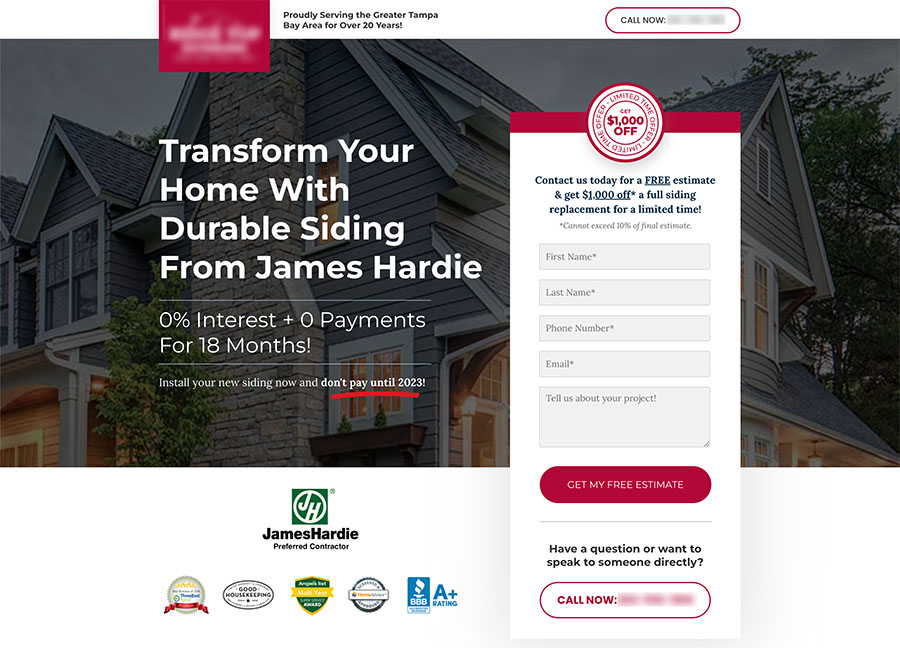
SEO landing pages and PPC landing pages serve different purposes. An SEO landing page draws organic search traffic by ranking for relevant keywords. These pages contain complete content, internal links and detailed information that addresses search intent at different stages of the buyer’s trip. They need time to build rankings and authority but generate traffic without ongoing advertising costs.
PPC landing pages are designed for paid advertising campaigns. They focus on immediate conversion with clear CTAs, minimal distractions and concise content that matches ad copy. The average Google Ads conversion rate sits at about 4-6% across industries, while top-performing landing pages can reach conversion rates above 10%. These pages work only as long as you continue paying for ads.
The structural differences run deep. Search engines index SEO landing pages and they remain visible to anyone searching for related topics. They include FAQs, detailed explanations and supporting content that builds topical authority. PPC landing pages often aren’t indexed to prevent duplicate content issues and maintain control over ad-specific messaging. These pages are removed or hidden when the campaign ends.
The ROI of Organic Landing Page Traffic
Calculating SEO ROI uses a simple formula: Estimated monthly value = Total monthly searches × CTR[Position] × Value per visit. A landing page that ranks #1 for a keyword with 14,000 monthly searches, at a 0.35 CTR and $0.65 value per visit (based on $50 average order value and 1.3% conversion rate), would generate $3,136 in monthly revenue. This generates $18,816 in total return over six months, representing a 276% ROI on a $5,000 original investment.
Another method assigns value using cost-per-click equivalents. Your landing page represents $48,000 in annual advertising savings if it ranks for keywords that would cost $4,000 monthly in PPC. Organic search often serves as a huge first-touch chance. Many users find websites through search, explore products and then return through email or direct visits to complete purchases.
When to Use SEO Landing Page Optimization
SEO landing pages work best for long-term, budget-friendly traffic generation. Use them when promoting evergreen offers like whitepapers, demos or service pages. They excel at targeting high-volume informational or commercial keywords and establishing topical authority through content-rich pages. Companies should allocate 5% to 10% of their revenue to SEO as an advertising cost.
Good results appear in three to six months, though competitive niches may need longer. SEO builds sustained traffic while PPC captures high-intent demand right away. Both can coexist in mature marketing strategies, but SEO provides the foundation for inbound traffic growth without the ongoing cost-per-click investment that paid channels need.
Step 1: Research and Target the Right Keywords
Keyword research provides the foundations of effective landing page SEO optimization. Even perfectly designed pages won’t reach your target audience without the right keywords.
Finding Transactional Keywords for Landing Pages
Transactional keywords indicate a searcher’s intent to buy something or take action on a website soon. These queries represent the highest conversion potential because users are ready to purchase or subscribe.
Start by brainstorming with buyer-intent modifiers. Common transactional modifiers have purchase words like “buy,” “order,” “purchase,” “get,” and “shop.” Cost-related terms such as “discount,” “deal,” “sale,” “coupon,” “cheap,” “price,” and “cost” signal price-conscious buyers. Action-oriented phrases like “sign up,” “download,” “subscribe,” “apply for,” and “request a quote” capture users ready to convert.
You might target “buy Nike running shoes,” “running shoe deals,” or “best price for Asics Gel-Kayano” if you’re selling running shoes. Service businesses benefit from modifiers like “near me” or location-specific terms that increase local relevance.
Using Keyword Research Tools Effectively
Keyword research tools reveal how, why, and at what time your target audiences search for businesses like yours. Google Keyword Planner provides suggested bid estimates for each keyword to help determine advertising budgets. The tool has a keyword generator to find related keyword ideas and can estimate costs to refine your marketing strategy.
Semrush groups keywords into four intent categories: commercial, navigational, informational, and transactional. Use the intent filter to identify transactional keywords in just two clicks. Filter for transactional keywords with low keyword difficulty to find achievable ranking opportunities during SEO campaign planning.
Filter keywords by search volume and competition to identify low-hanging fruit. Look for solid monthly search volume, manageable keyword difficulty, and clear purchase intent. Google’s autocomplete suggestions and “People also ask” sections reveal real searches people are making. The “Related searches” section often surfaces long-tail transactional keywords that are specific and easier to rank for.
Mapping One Primary Keyword Per Landing Page
Every page on your website should have one defined primary keyword. That phrase becomes your H1 focus, informs your meta title, and directs the overall content strategy. Your website stops competing with itself once you implement keyword mapping correctly.
Assign one primary keyword per page to prevent keyword cannibalization. Search engines struggle to determine which page to rank if multiple pages target the same keyword. Your keyword map should have columns for page URL, primary keyword, supporting H2 and H3 keywords, and geographic modifiers.
Identifying Secondary and Semantic Keywords
Secondary keywords are synonyms, subtopics, and phrases related to the primary keywords on a web page. A page targeting “computer mouse” could have “wireless mouse,” “ergonomic mouse,” and “best mouse for a computer” to support the primary term.
Semantic keywords provide contextual cues that satisfy search engines without making pages unbearable to read. Group keywords by semantics like “yoga poses,” “yoga postures,” and “asanas list.” Think over user intent variations such as “how to do yoga asanas” or “what are the beginner yoga poses.”
Each secondary keyword should appear at least once in the content. Use variations in subheadings, image alt text, and meta descriptions that make sense, but the primary keyword remains the focus.
Step 2: Build Your Landing Page with SEO Best Practices
Once you’ve mapped your keywords, the next step involves implementing them into your landing page structure. Each on-page element plays a role in helping search engines understand your content and convincing users to click.
Optimizing Title Tags and Meta Descriptions
Your title tag appears as the clickable headline in search results and should stay under 60 characters. Place your primary keyword at the front, followed by a separator like a pipe or hyphen, then your brand name. Write for humans first, but make sure the focus keyword appears in a natural way.
Meta descriptions don’t influence rankings, but they affect click-through rates. Keep them between 120 and 156 characters. Use an active voice and include a clear call to action. Google highlights your target keyword in search results when it appears in the meta description, which increases visibility. Make each description unique and confirm it reflects the page content.
Structuring Content with Header Tags (H1, H2, H3)
Use one H1 tag per page to define the main topic. This heading should contain your primary keyword and communicate what the page offers. H2 tags divide your content into main sections below that, while H3 tags create subsections within those H2 areas.
Never skip heading levels. An H3 should follow an H2, not jump from H1. This hierarchy helps screen readers guide through your page and signals content importance to search engines. Write headings that describe what each section contains rather than using vague labels.
Creating SEO-Friendly URLs
Short, descriptive URLs perform better than long strings of numbers. Keep URLs around 60 characters and use hyphens to separate words. Search engines treat hyphens as spaces, which makes “custom-software-development” readable as three distinct terms. Underscores, on the other hand, may be interpreted as one continuous word.
Use lowercase letters consistently. URLs are case-sensitive, so “Services” and “services” become different pages and split your authority. Include your primary keyword in the URL slug in a natural way, but avoid stuffing multiple keywords.
Writing Alt Text for Images
Alt text serves two purposes: accessibility for screen readers and context for search engines. Keep descriptions under 125 characters, as most screen readers stop reading beyond that point. Describe what the image shows and how it relates to your page content.
Include your focus keyword in at least one image’s alt text, but only when it fits in a natural way. Avoid starting with “image of” or “picture of” since screen readers already identify the element as an image. Use an empty alt attribute for decorative images.
Placing Your CTA Above the Fold
Users spend 80% of their time on content above the fold before scrolling. Your call-to-action in this visible area gets immediate attention. Simple offers like app downloads or newsletter signups work well with an above-the-fold CTA.
But complex products that need explanation may benefit from below-the-fold placement. Marketing Experiments found that below-the-fold CTAs resulted in a 20% increase in conversions when paired with persuasive content. The key lies in matching CTA placement to how much information users need before they commit.
Adding SEO Content Below the Fold
Content below the fold still gets indexed and contributes to rankings. Search engines read this content but may assign it less weight than above-the-fold material. Use this space for detailed product descriptions, customer reviews, FAQs and supporting information that builds trust.
Well-laid-out below-the-fold content increases time on page and reduces bounce rates. Include internal links to related pages, use subheadings to organize information and place secondary CTAs throughout this section.
Step 3: Optimize Technical Performance and User Experience
Technical performance affects your landing page SEO optimization success. Search engines prioritize pages that load fast and provide stable, responsive experiences.
Improving Core Web Vitals (LCP, INP, CLS)
Core Web Vitals measure loading performance, interactivity and visual stability. Aim for Largest Contentful Paint under 2.5 seconds, Interaction to Next Paint under 200 milliseconds and Cumulative Layout Shift under 0.1. 40% of sites fail to meet the recommended LCP threshold.
<citation index=”2″ link=”https://web.dev/articles/top-cwv” similar_text=”The Chrome team has noticed the following in regard to LCP on the web: Per the 2024 Web Almanac by HTTP Archive, 73% of mobile pages have an image as their LCP element. An analysis of real-user data from Chrome shows that the majority of origins with poor LCP spend less than 10% of their p75 LCP time downloading the LCP image. Among pages with poor LCP, loading their LCP images is delayed on the client by 1,290 milliseconds at the 75th percentile—that’s more than half of the budget for a fast experience. Of pages where the LCP element was an image, 35% of those images had source URLs that were not discoverable in the initial HTML response (such as  or ), which would allow the browser’s preload scanner to discover them as soon as possible. According to the Web Almanac, 15% of eligible pages were taking advantage of the fetchpriority HTML attribute to give higher priority to resources—including those that could improve a page’s LCP with relatively little effort.”>Images account for 73% of mobile LCP elements. Your LCP resource should appear in the HTML source using standard img tags with src attributes rather than data-src. Add fetchpriority=”high” to prioritize loading. Set explicit width and height attributes on images to prevent layout shifts, as 66% of pages have at least one unsized image. CSS properties that trigger layout recalculation should not be animated.
Making Your Landing Page Mobile-First
Mobile devices generate 68.1% of global website visits. Users expect pages to load within three seconds, yet 70% of mobile landing pages take over seven seconds. Fifty-three percent of mobile visitors abandon slow pages.
Compress files and use appropriate formats to optimize images. Remove unnecessary content. Test your page through Google’s PageSpeed Insights for specific recommendations. Large, well-spaced clickable elements work best for one-handed navigation since 75% of users navigate with one finger.
Publishing to Your Own Domain
Host your landing page on a custom domain to boost branding, strengthen credibility and improve SEO. Create a CNAME record pointing to your landing page platform. DNS verification takes 24-48 hours, sometimes up to 72 hours. Enable SSL encryption for security and trust. Use subdomains if your main domain hosts an existing website.
Building Internal Links to Your Landing Page
Internal links help search engines find pages, distribute authority and clarify page relationships. Link from high-authority pages to your landing page to pass ranking power. Keep internal links to 2-4 per 500 words of content. Use descriptive anchor text that indicates the destination page rather than generic phrases.
Step 4: Create Quality Content and Earn Backlinks
Quality content attracts both users and backlinks organically when it solves ground problems.
Writing Content That Matches Search Intent
Search optimization has moved from chasing keywords to arranging content with the intent behind every query. Answer likely questions upfront rather than burying key advice deep within the content. Place direct answers at the top so Google can feature them in snippets. Break down complex ideas with bullets, visuals, or short videos. Anticipate common follow-up questions with FAQ sections that keep readers involved long enough to take action.
Including Social Proof and Customer Reviews
Online reviews can raise conversion rates by as much as 270%. Customer testimonials and reviews should be positioned near call-to-action buttons or within sections that address common objections. Photos and videos work better alongside testimonials since visual elements involve readers more than text alone. 63% of consumers are more likely to purchase from brands that include product ratings and reviews.
Building High-Quality Backlinks to Your Page
Links should be earned through expert content worth referencing. Original data, free tools, templates, and calculators work as standalone assets that people cite naturally. Publish these on unique URLs so others can link directly to them. Your website gains legitimacy in search engines’ eyes when you link to reputable sites and subject matter experts.
Updating Your Landing Page Regularly
Google instructs quality raters to look for content added and updated over time as a sign of quality. High-performing pages need revisiting every 3-6 months to update offers, refresh keywords, and verify accuracy. Google rewards freshness, especially in competitive topics.
Key Takeaways
Master these four essential steps to transform your landing pages into organic traffic magnets that rank higher and convert consistently without ongoing ad spend.
• Target transactional keywords with buyer intent modifiers like “buy,” “discount,” or “near me” to capture high-converting search traffic
• Optimize on-page elements: place primary keywords in H1 tags, keep title tags under 60 characters, and structure content with proper header hierarchy
• Improve Core Web Vitals by achieving LCP under 2.5 seconds, mobile-first design, and hosting on your own domain for better SEO authority
• Create quality content that matches search intent and earn backlinks through original data, tools, and expert resources that others naturally reference
• Update landing pages every 3-6 months to maintain freshness signals that Google rewards with sustained rankings
You now have a complete roadmap to optimize your landing pages for higher rankings and sustained organic traffic. The process comes down to four key steps: target the right transactional keywords, build pages with solid SEO structure, optimize technical performance for Core Web Vitals, and create quality content that earns backlinks.
Landing page SEO compounds over time beautifully. Paid ads stop the moment your budget runs out, but organic rankings continue delivering qualified visitors month after month.
Start with one high-priority landing page and implement these best practices. Track your progress. Your rankings will improve, and your conversions will follow.
FAQs
Q1. Should I put keyword-focused content directly on my main landing page or create separate subpages? A balanced approach works best. Include valuable content targeting your primary keyword on the main landing page while also linking to detailed subpages that target more specific, long-tail keywords. This strategy satisfies both user intent and SEO best practices by providing essential information upfront while offering deeper content on related topics.
Q2. How long does it typically take to see results from landing page SEO? Good results typically appear within three to six months, though competitive niches may require longer. Unlike paid advertising that delivers immediate traffic, SEO builds sustained organic traffic over time. The investment compounds as your rankings improve, delivering qualified visitors month after month without ongoing advertising costs.
Q3. What’s the difference between SEO landing pages and PPC landing pages? SEO landing pages are designed to rank organically in search results and contain comprehensive content with internal links to build topical authority. PPC landing pages focus on immediate conversion from paid ads with minimal distractions and concise content. SEO pages remain visible indefinitely and generate traffic without ongoing costs, while PPC pages only work when you’re actively paying for advertising.
Q4. How many keywords should I target on a single landing page? Each landing page should focus on one primary keyword that becomes your H1 and directs your overall content strategy. Support this with secondary and semantic keywords (synonyms and related phrases) that appear naturally throughout the content. This prevents keyword cannibalization where multiple pages compete against each other for the same search terms.
Q5. Do I need separate landing pages for SEO and paid advertising traffic? It’s recommended to create separate pages for organic SEO traffic and paid advertising campaigns. SEO pages should be indexed with optimized content, proper header tags, and comprehensive information. Paid traffic landing pages can be set to no-index and focus purely on conversion with messaging that matches your ad copy, as these audiences have different intents and expectations.